
New Quoting Experience (Early Access Feature)
Get early access to the new and improved quote viewer & editor, a full refresh of how you view and edit quotes in Jobman. We've rebuilt the quote UI from the ground up, with a focus on speed, clarity and handling larger quotes.
Early Access Features are new features still under development, which you can enable for your organisation to test and provide feedback before they're officially released.
These features can be enabled & disabled in Settings > Early Access Features.

NOTE: you must be an administrator or have the permission "Update experimental feature settings" to enable an Early Access Feature for your organisation.
In this article:
How to Enable/Disable the New Quoting Experience
Opt-out / Switch to Classic Experience
New Quoting Experience Features
How to Enable/Disable the New Quoting Experience
By enabling the New Quoting Experience for your organisation, all staff members will automatically have access to the new quote viewer/editor the next time they load Jobman. Individual users can opt-out at any time if they're experiencing issues (details below).
To enable the New Quoting Experience for your organisation, follow these steps:
- Go to Settings > Early Access Features.
-
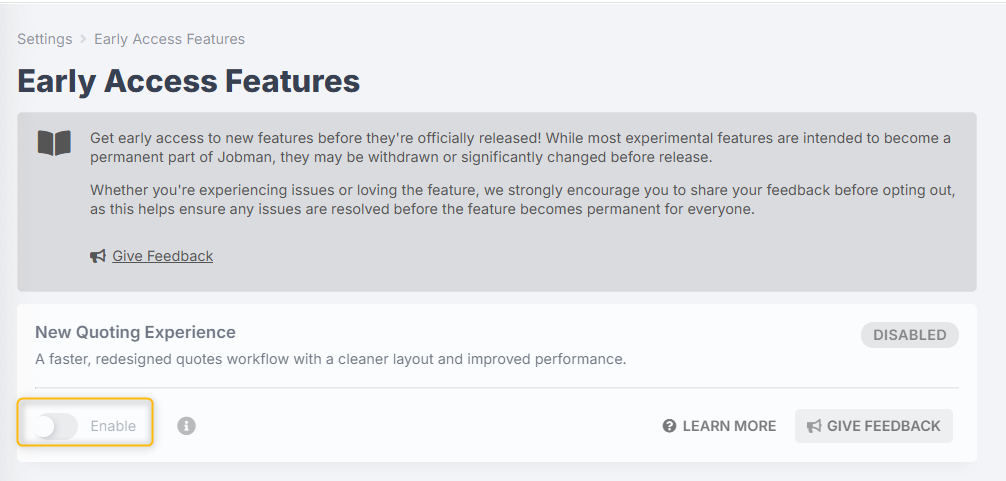
Under New Quoting Experience, toggle on the Enable switch:
-
This will allow all users in your organisation with permissions to view and edit quotes to access the New Quoting Experience.

The next time you or your staff open a quote with the New Quoting Experience enabled, you will see a purple banner at the top of your screen confirming the new UI is active.

Opt-out / Switch to Classic Experience
If an individual user in your organisation is experiencing issues with the new quote viewer/editor, they can disable the New Quoting Experience by clicking Switch to Classic Experience in the purple banner, or via the three-dot menu when viewing a quote:

Or when editing a quote:

Once users have switched to the classic experience, they can opt-back-in to the New Quoting Experience by clicking Switch to New Experience via the three-dot menu when viewing a quote:

Or when editing a quote:

NOTE: This Early Access period is your opportunity to shape the final experience before the classic editor is removed.
If you're opting out due to an issue or a missing feature, please share your feedback so we can resolve any issues before the Classic Experience is replaced with the New Quoting Experience.
An administrator can disable the New Quoting Experience for the entire organisation by navigating to Settings > Early Access Features, and toggling off the Enable switch:


New Quoting Experience Features
The New Quoting Experience is a fully rebuilt quote viewer and editor, designed to help you build and manage quotes faster and with fewer interruptions. Here's what's new:
-
Faster loading:
Quote pages load significantly faster across the board, with the biggest improvement on larger, more complex quotes.
-
Uninterrupted editing:
Previously, every save or recalculation triggered all item/component/element grids to fully reload, temporarily preventing edits. Now, your draft quote saves and recalculates in the background while you keep editing, no freezing, no losing your place.
-
Refreshed editor:
The editor has been rebuilt with a focus on keeping everything you need within reach:
- Key actions like publishing and adding items are always visible, no more scrolling to find them
- Totals update in real time as you add and modify layers of your quote
- Right-click menus give you fast access to common actions on items, components, and elements
- Preview your draft quote at any time in a pop-up window without leaving the editor
- And much more!
Giving Feedback
This feature is still in Early Access while we put the finishing touches on it. Before the classic experience is retired, we would like to hear your feedback to make sure the new experience works well for your team.
If you are experiencing any issues, something doesn't feel right, or you have positive feedback/suggestions, please let us know by clicking Give Feedback on the purple banner, or by navigating to Settings > Early Access Features and under New Quoting Experience, click Give Feedback:

